OLAP和OLTP
数据库系统可以在广义上分为联机事务处理(Online Transaction Process,OLTP)和联机分析处理(Online Analyze Process,OLAP)两种面向不同领域的数据库,OLAP数据库也被称为数据仓库。从产品上看,有专门面向OLTP的数据库,例如MySQL、PostgreSQL、Oracle等,也有专门面向OLAP的数据库,例如Hive、Greenplum、HBase、ClickHouse等
| OLAP | OLTP | |
| 用途 | 数据仓库 | 事物数据库 |
| 业务目的 | 处理业务,如订单、合同等 | 业务支持决策 |
| 面向对象 | 业务处理人员 | 分析决策人员 |
| 主要工作负载 | 增、删、改 | 查询 |
| 数据容量 | 大,PB级 | 小,GB级 |
| 事务能力 | 弱(或无) | 强 |
| 分析能力 | 强 | 弱,只能做简单的分析 |
| 数据来源 | 各业务数据库 | 各业务系统 |
| 设计原则 | 允许一定的冗余,基于数据仓库建模设计,为了更好的进行数据查询分析 | 基于三大范式进行数据库设计,所以查询时候会导致多表join关联查询,产生查询慢,不利于数据分析的问题 |
OLAP场景的关键特征
OLAP通常不直接产生数据,而是利用已有的数据进行建模分析。
1、绝大多数是读请求
2、数据以相当大的批次(> 1000行)更新,而不是单行更新;或者根本没有更新。
3、已添加到数据库的数据不能修改。
4、对于读取,从数据库中提取相当多的行,但只提取列的一小部分。
5、宽表,即每个表包含着大量的列
6、查询相对较少(通常每台服务器每秒查询数百次或更少)
7、对于简单查询,允许延迟大约50毫秒
8、列中的数据相对较小:数字和短字符串(例如,每个URL 60个字节)
9、处理单个查询时需要高吞吐量(每台服务器每秒可达数十亿行)
10、事务不是必须的
11、对数据一致性要求低
12、每个查询有一个大表。除了他以外,其他的都很小。
13、查询结果明显小于源数据。换句话说,数据经过过滤或聚合,因此结果适合于单个服务器的RAM中
ClickHouse简介
ClickHouse是俄罗斯Yandex公司于2016年开源的一个用于联机分析(OLAP)的列式数据库管理系统。
ClickHouse可以在存储数据超过20万亿行的情况下,做到了90%的查询能够在1秒内返回。
官网地址:https://clickhouse.com/
安装
支持多种安装方式,这里使用docker的安装方式。更多安装方式参考:
https://clickhouse.com/docs/zh/getting-started/install
安装docker
略
安装clickhouse server
docker run -d -p 18123:8123 -p19000:9000 --name some-clickhouse-server --ulimit nofile=262144:262144 clickhouse/clickhouse-server
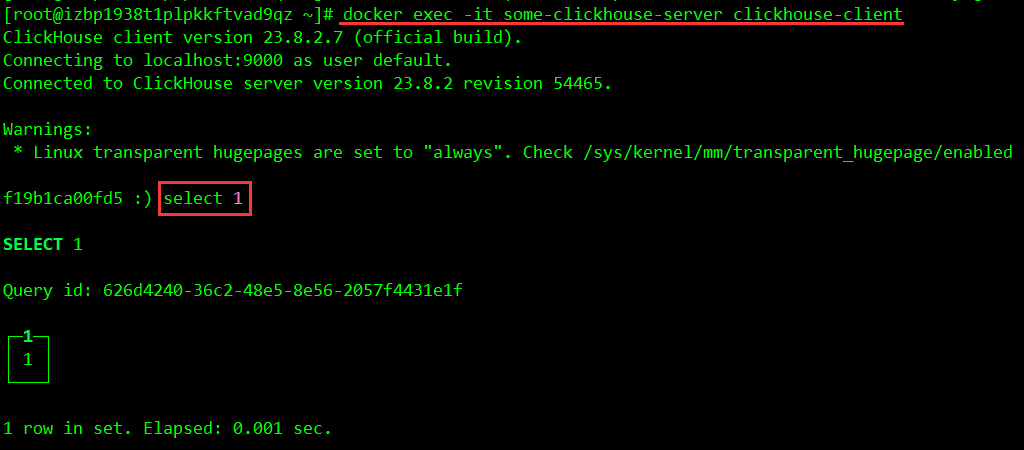
使用客户端连接
docker exec -it some-clickhouse-server clickhouse-client
使用 curl 连接
echo 'SELECT 1' | curl 'http://localhost:18123/' --data-binary @-

导入测试数据
测试数据来源:https://clickhouse.com/docs/zh/getting-started/example-datasets/menus
下载数据集
# 进入容器
docker exec -it some-clickhouse-server /bin/bash
# 进入home目录
cd /home
# 下载数据集
wget https://s3.amazonaws.com/menusdata.nypl.org/gzips/2021_08_01_07_01_17_data.tgz
# 解压数据集
tar xvf 2021_08_01_07_01_17_data.tgz
# 退出容器
exit;
创建测试数据库
# 进入容器
docker exec -it some-clickhouse-server clickhouse-client
# 创建数据库
CREATE DATABASE IF NOT EXISTS tutorial
# 查看有哪些数据库
SHOW DATABASES;
使用测试数据库
use tutorial;
创建表
CREATE TABLE dish \
( \
    id UInt32, \
    name String, \
    description String, \
    menus_appeared UInt32, \
    times_appeared Int32, \
    first_appeared UInt16, \
    last_appeared UInt16, \
    lowest_price Decimal64(3), \
    highest_price Decimal64(3) \
) ENGINE = MergeTree ORDER BY id;  \

CREATE TABLE menu \
( \
    id UInt32, \
    name String, \
    sponsor String, \
    event String, \
    venue String, \
    place String, \
    physical_description String, \
    occasion String, \
    notes String, \
    call_number String, \
    keywords String, \
    language String, \
    date String, \
    location String, \
    location_type String, \
    currency String, \
    currency_symbol String, \
    status String, \
    page_count UInt16, \
    dish_count UInt16 \
) ENGINE = MergeTree ORDER BY id;  \

CREATE TABLE menu_page \
( \
    id UInt32, \
    menu_id UInt32, \
    page_number UInt16, \
    image_id String, \
    full_height UInt16, \
    full_width UInt16, \
    uuid UUID \
) ENGINE = MergeTree ORDER BY id; \

CREATE TABLE menu_item \
( \
    id UInt32, \
    menu_page_id UInt32, \
    price Decimal64(3), \
    high_price Decimal64(3), \
    dish_id UInt32, \
    created_at DateTime, \
    updated_at DateTime, \
    xpos Float64, \
    ypos Float64 \
) ENGINE = MergeTree ORDER BY id;
查看有哪些表
SHOW TABLES
导入数据
# 进入容器
docker exec -it some-clickhouse-server /bin/bash
clickhouse-client --format_csv_allow_single_quotes 0 --input_format_null_as_default 0 --query "INSERT INTO tutorial.dish FORMAT CSVWithNames" < /home/Dish.csv
clickhouse-client --format_csv_allow_single_quotes 0 --input_format_null_as_default 0 --query "INSERT INTO tutorial.menu FORMAT CSVWithNames" < /home/Menu.csv
clickhouse-client --format_csv_allow_single_quotes 0 --input_format_null_as_default 0 --query "INSERT INTO tutorial.menu_page FORMAT CSVWithNames" < /home/MenuPage.csv
clickhouse-client --format_csv_allow_single_quotes 0 --input_format_null_as_default 0 --date_time_input_format best_effort --query "INSERT INTO tutorial.menu_item FORMAT CSVWithNames" < /home/MenuItem.csv
非规范化数据
数据以 [规范化形式] 在多个表格中呈现。这意味着如果你想进行如查询菜单项中的菜名这类的查询,则必须执行 JOIN。在典型的分析任务中,预先处理联接的数据以避免每次都执行“联接”会更有效率。这中操作被称为“非规范化”数据。
创建一个表“menu_item_denorm”,其中将包含所有联接在一起的数据:
CREATE TABLE menu_item_denorm
ENGINE = MergeTree ORDER BY (dish_name, created_at)
AS SELECT
    price,
    high_price,
    created_at,
    updated_at,
    xpos,
    ypos,
    dish.id AS dish_id,
    dish.name AS dish_name,
    dish.description AS dish_description,
    dish.menus_appeared AS dish_menus_appeared,
    dish.times_appeared AS dish_times_appeared,
    dish.first_appeared AS dish_first_appeared,
    dish.last_appeared AS dish_last_appeared,
    dish.lowest_price AS dish_lowest_price,
    dish.highest_price AS dish_highest_price,
    menu.id AS menu_id,
    menu.name AS menu_name,
    menu.sponsor AS menu_sponsor,
    menu.event AS menu_event,
    menu.venue AS menu_venue,
    menu.place AS menu_place,
    menu.physical_description AS menu_physical_description,
    menu.occasion AS menu_occasion,
    menu.notes AS menu_notes,
    menu.call_number AS menu_call_number,
    menu.keywords AS menu_keywords,
    menu.language AS menu_language,
    menu.date AS menu_date,
    menu.location AS menu_location,
    menu.location_type AS menu_location_type,
    menu.currency AS menu_currency,
    menu.currency_symbol AS menu_currency_symbol,
    menu.status AS menu_status,
    menu.page_count AS menu_page_count,
    menu.dish_count AS menu_dish_count
FROM menu_item
    JOIN dish ON menu_item.dish_id = dish.id
    JOIN menu_page ON menu_item.menu_page_id = menu_page.id
    JOIN menu ON menu_page.menu_id = menu.id;
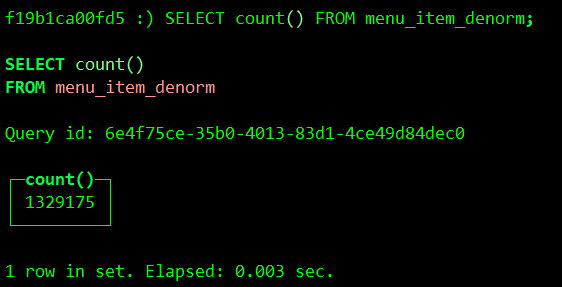
验证数据
SELECT count() FROM menu_item_denorm;
运行一些查询
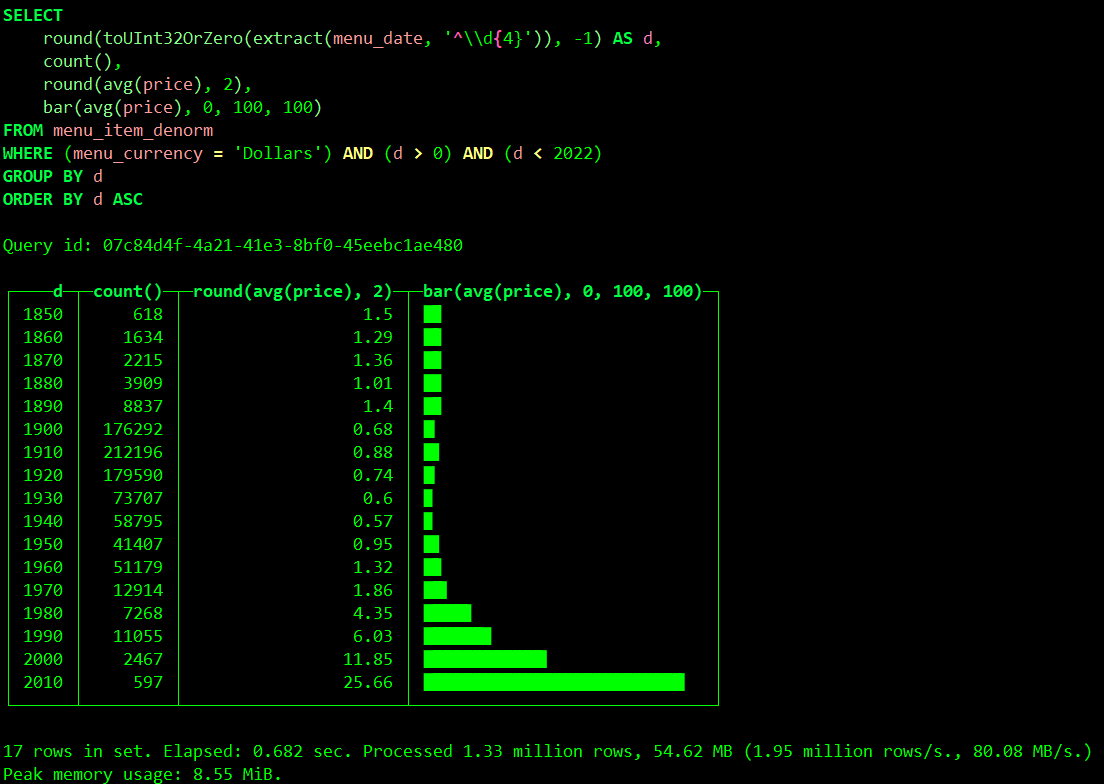
菜品的平均历史价格
SELECT
    round(toUInt32OrZero(extract(menu_date, '^\\d{4}')), -1) AS d,
    count(),
    round(avg(price), 2),
    bar(avg(price), 0, 100, 100)
FROM menu_item_denorm
WHERE (menu_currency = 'Dollars') AND (d > 0) AND (d < 2022)
GROUP BY d
ORDER BY d ASC;